Manage Reports
Overview
The Coordinator Manage Reports system is a sophisticated report generation and management platform designed for comprehensive administrative oversight of the student work program. This powerful interface enables coordinators to generate, synchronize, download, and manage detailed monthly reports with automated semester-based batch processing capabilities.
Page Structure and Navigation
Professional Navigation Hierarchy
Clear breadcrumb navigation tailored for coordination operations:
- Main Menu → Coordinator → Work Program → Manage Reports
- Back Button: Returns to Coordinator Work Program Menu
- Coordinator-Specific Layout: Professional interface designed for administrative reporting needs
Semester-Based Control System
- Dynamic Semester Dropdown: Access to all available academic semesters
- Auto-Selection: Automatically selects current semester on load
- Year Integration: Automatically updates year filter based on semester selection
- Real-Time Updates: All reports refresh when semester changes
Advanced Report Generation System
Intelligent Batch Report Creation
Revolutionary semester-based report generation with sophisticated automation:
Smart Semester Analysis
- Date Range Detection: Automatically calculates all months within semester period
- Month Identification: Generates individual reports for each month in the semester
- Timeline Validation: Ensures reports cover complete semester duration
- Academic Calendar Integration: Respects institutional academic calendar boundaries
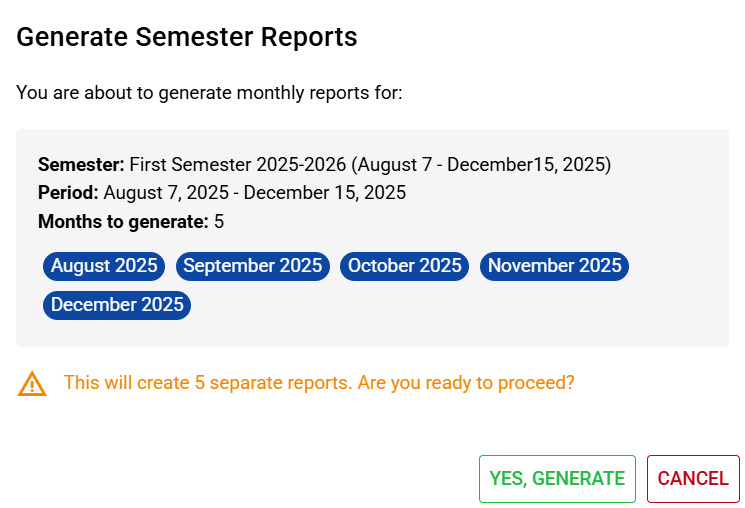
Confirmation Dialog System
Professional confirmation interface before batch generation:
Comprehensive Information Display
- Semester Details: Full semester title and date range
- Period Breakdown: Clear start and end date formatting
- Month Count: Total number of reports to be generated
- Month Visualization: Color-coded chips showing each month to be processed
- Warning System: Clear alerts about the scope of generation process
User-Friendly Validation
- Clear Messaging: Explains exactly what will be generated
- Visual Confirmation: Month chips provide clear visual representation
- Action Buttons: Professional confirmation and cancellation options
- Loading States: Proper feedback during generation process
Comprehensive Report Management
Professional Data Table Interface
Sophisticated table displaying all generated reports:
Column Structure
- ID: Unique report identifier for tracking
- TITLE: Descriptive report title with semester and month information
- MONTH: User-friendly month and year display formatting
- ACTIONS: Professional action buttons for report operations
Enhanced Filtering System
- Real-Time Search: Instant filtering across all report fields
- Smart Search: Searches across ID, title, and formatted dates
- Debounced Input: Optimized search performance with 300ms delay
- Clear Results: Instant visual feedback for search results
Advanced Report Operations
Synchronize and Download Functionality
Sophisticated dual-operation system combining sync and download:
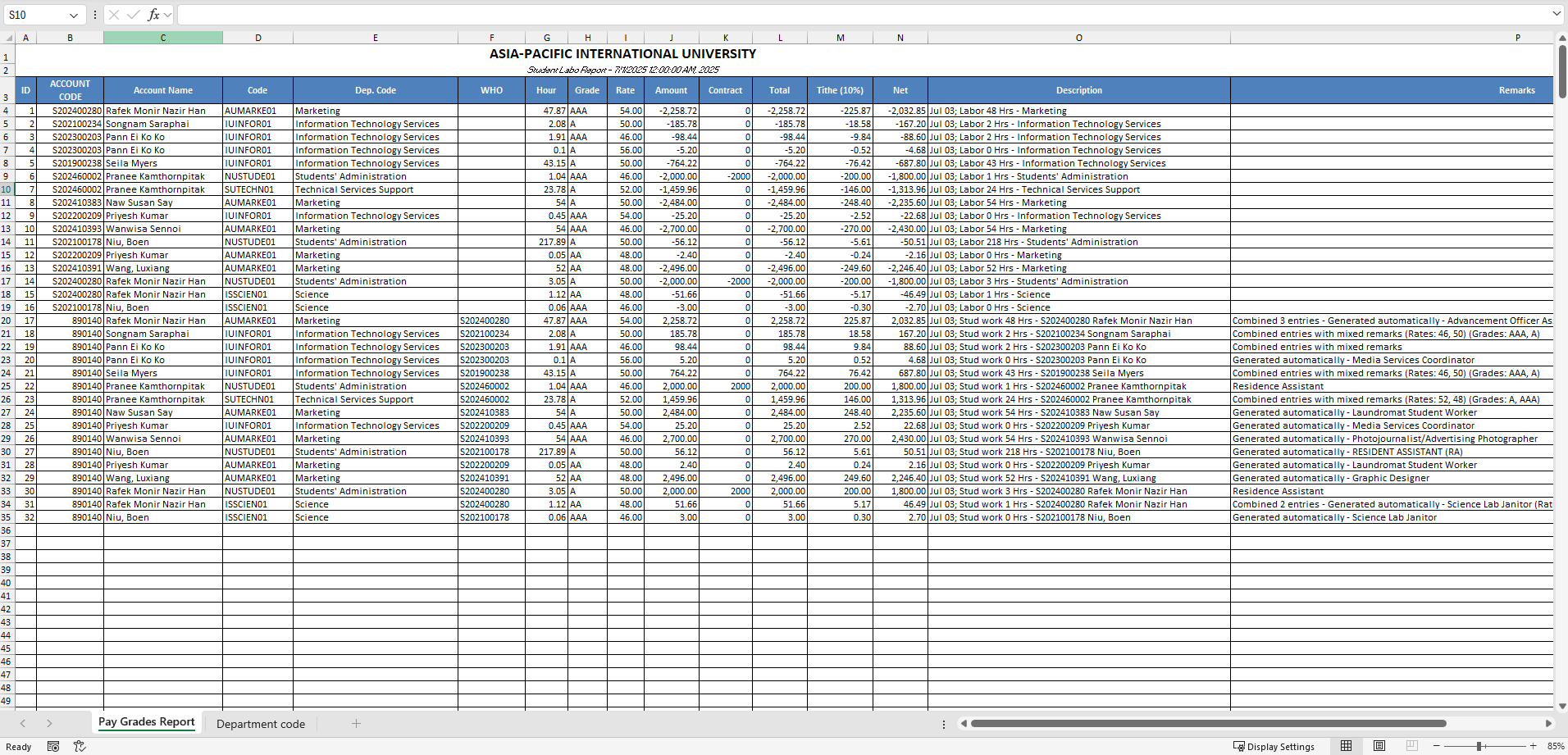
Smart Sync Process
- Data Synchronization: Updates report with latest program data
- Automatic Download: Immediately downloads after successful sync
- File Format Detection: Handles both Excel files and JSON responses
- Error Handling: Graceful handling of sync failures with clear messaging
Professional Download Management
- Blob Handling: Proper file blob management for downloads
- Filename Generation: Automatic filename with month identification
- Progress Indicators: Loading states during sync and download operations
- Success Confirmation: Clear feedback on successful operations
Best Practices for Coordinators
Daily Operations
- Semester Verification: Ensure correct semester is selected
- Report Status Review: Check status of existing reports
- Regular Synchronization: Keep reports current with latest data
- Download Management: Organize downloaded reports systematically
- Error Monitoring: Address any failed operations promptly
Monthly Procedures
- Report Generation: Generate reports for completed months
- Data Validation: Verify report accuracy and completeness
- Archive Management: Properly archive downloaded reports
- System Maintenance: Clean up unnecessary reports
- Backup Procedures: Ensure proper backup of critical reports
Semester Procedures
- Bulk Generation: Use batch generation for new semesters
- Complete Review: Comprehensive review of all semester reports
- Archive Organization: Systematic archival of semester data
- Administrative Preparation: Prepare reports for institutional review
- System Cleanup: Remove temporary or outdated reports
Annual Planning
- Historical Analysis: Review report patterns from previous years
- System Optimization: Coordinate system improvements with IT
- Process Review: Evaluate and improve reporting procedures
- Training Updates: Update staff training on new features
- Compliance Review: Ensure continued institutional compliance
This comprehensive report management system provides coordinators with all the tools needed for professional administrative reporting while maintaining the highest standards of data integrity, user experience, and institutional compliance.