Track Student Hours
Overview
The Track Student Hours page is a comprehensive tool for monitoring, reviewing, and managing student work hours across the work program. This powerful interface offers both traditional table views and modern card-based layouts for optimal workflow management.
Getting Started
Access this page by clicking the "Track Student Hours" card on the Work Program Menu dashboard. The page automatically loads all student work logs and provides real-time filtering and management capabilities.
Page Layout and Navigation
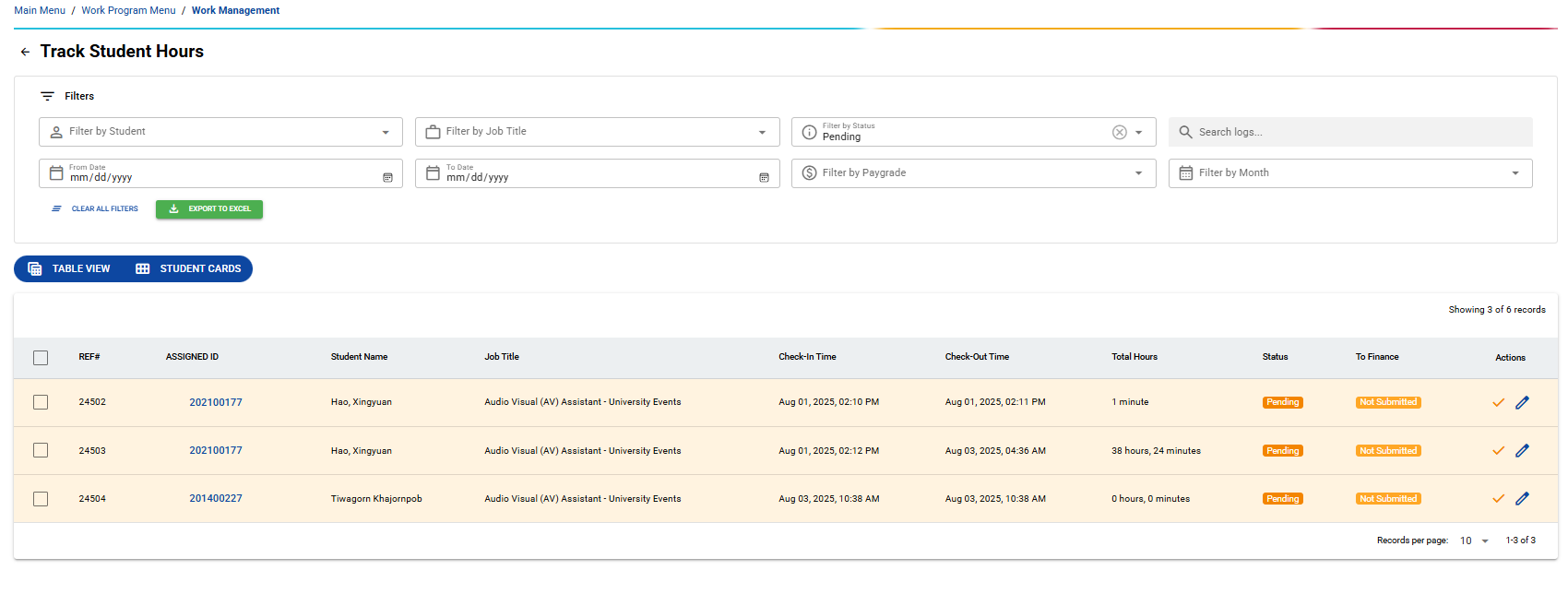
Header Section
- Breadcrumb Navigation: Clear path showing Main Menu > Work Program Menu > Work Management
- Back Button: Quick return to the Work Program Menu
- Page Title: "Track Student Hours" with professional styling
Advanced Filtering System
Comprehensive Filter Options
The page features an extensive 8-filter system organized in a clean card layout:
Row 1: Core Filters
- Student Filter: Select specific students from dropdown
- Job Title Filter: Filter by work position
- Status Filter: Filter by approval status (Pending/Approved/Disapproved)
- Search Box: Free-text search across all log data
Row 2: Advanced Filters
- From Date: Start date for date range filtering
- To Date: End date for date range filtering
- Paygrade Filter: Shows submission status to Finance office
- Month Filter: Filter by specific months with automatic detection
Filter Features
- Smart Options: Filter dropdowns populate based on available data
- Date Range: Flexible date filtering with visual calendar inputs
- Clear All: One-click filter reset functionality
- Export Function: Excel export with current filter settings applied
- Results Counter: Real-time display of filtered vs. total records
Dual View Modes
Table View (Traditional)
Professional data table with comprehensive functionality:
Column Structure
- REF#: Unique reference number for tracking
- ASSIGNED ID: Student ID (clickable for individual reports)
- Student Name: Full student name
- Job Title: Work position
- Check-In/Out Times: Formatted date-time display
- Total Hours: Calculated work duration
- Status: Color-coded approval status
- To Finance: Submission status to Finance office
- Actions: Individual action buttons
Bulk Operations
- Multi-Selection: Checkbox-based selection system
- Bulk Approval: Approve multiple hours simultaneously
- Selection Counter: Shows number of selected records
- Smart Validation: Prevents invalid operations
Student Cards View (Modern)
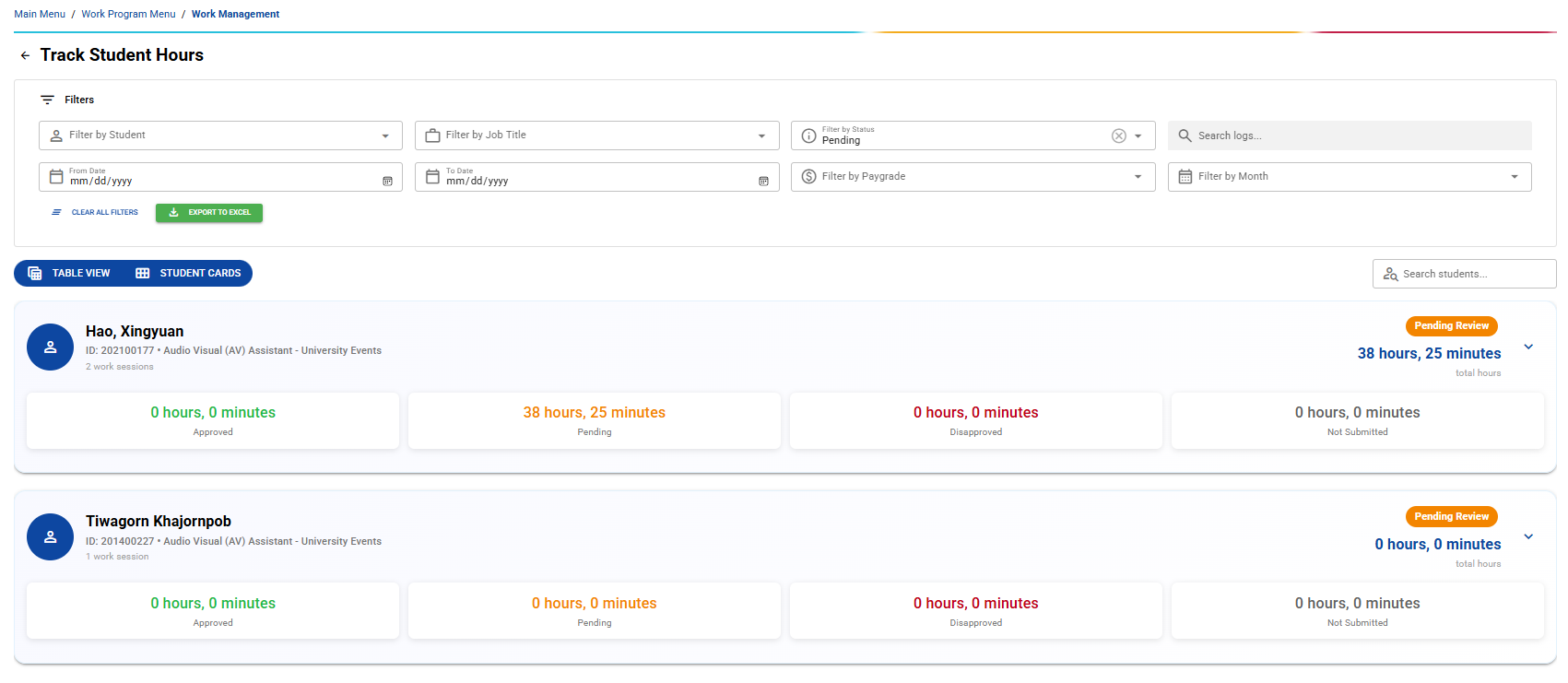
Innovative card-based interface for better student-focused management:
Individual Student Cards
Each card displays:
- Student Avatar: Visual student representation
- Basic Info: Name, ID, job title, and session count
- Status Overview: Overall student status with color coding
- Total Hours: Aggregate hours display
- Quick Stats: Approved, pending, disapproved, and unsubmitted hours
Expandable Details
Click to expand any student card for:
- Quick Actions: View full report and bulk approve buttons
- Recent Sessions: Last 5 work sessions with status indicators
- Session Details: Time ranges, hours, and reference numbers
- Individual Controls: Approve/edit buttons for each session
Card Features
- Search Function: Dedicated student search in card view
- Status Colors: Visual status indicators throughout
- Hover Effects: Interactive feedback on all elements
- Responsive Design: Adapts to different screen sizes
Hours Management
Individual Hour Operations
Approval Process
- Single Approval: Click approve button for individual sessions
- Status Validation: Prevents double-approval or invalid actions
- Instant Feedback: Real-time status updates with notifications
Edit Functionality
Comprehensive editing dialog with organized sections:
Time Input Section
- Check-Out Time: Date-time picker with validation
- Quick Actions: "Current Time" and "Clear" buttons
- Format Validation: Ensures proper time format
Supervisor Remarks Section
- Text Area: Multi-line remarks with character counter (500 max)
- Previous Remarks: Display of existing supervisor comments
- Professional Layout: Clear visual organization
Charge To Section
- Optional Feature: Enable/disable charge to specific accounts
- Account Field: Name or account number input (200 characters)
- Smart Validation: Required when enabled, optional when disabled
Disapproval Process
- Confirmation Dialog: Prevents accidental disapprovals
- Permanent Action: Clear warning about irreversible nature
- Status Update: Immediate reflection in system
Bulk Operations
Multiple Selection
- Checkbox System: Select multiple hours for bulk operations
- Smart Filtering: Only eligible hours can be selected
- Visual Feedback: Selected count display
- Status Awareness: Disabled checkboxes for processed hours
Bulk Approval
- Validation: Only pending hours can be bulk approved
- Confirmation: Verify before processing multiple records
- Progress Feedback: Loading indicators during processing
- Success Notification: Detailed results of bulk operations
Data Export Features
Excel Export Functionality
- Filtered Data: Exports only currently filtered records
- Comprehensive Data: All columns and calculated fields included
- Automatic Naming: Timestamp-based file naming
- Progress Indicators: Loading states during export process
- Error Handling: Graceful handling of export failures
Status Management System
Color-Coded Status Indicators
- Green (Approved): Hours validated and approved
- Orange (Pending): Awaiting supervisor review
- Red (Disapproved): Hours rejected by supervisor
- Gray (Various): Other states like not submitted
Status Validation Logic
- Workflow Rules: Prevents invalid status transitions
- Business Logic: Ensures data integrity throughout process
- User Feedback: Clear messaging about status changes
Smart Features and Automation
Real-Time Updates
- Dynamic Filtering: Instant results as filters change
- Status Monitoring: Live status updates across interface
- Data Refresh: Automatic refresh after operations
Intelligent Defaults
- Status Filtering: Defaults to "Pending" for efficiency
- Date Handling: Smart date parsing and formatting
- Time Calculations: Automatic hour calculations with proper rounding
Responsive Design
- Mobile Friendly: Adapts to smaller screens
- Touch Optimized: Easy interaction on tablets
- Progressive Enhancement: Core functionality works on all devices
Error Handling and Validation
Input Validation
- Required Fields: Clear marking of mandatory fields
- Date Validation: Prevents invalid date entries
- Time Logic: Ensures check-out after check-in times
- Character Limits: Enforced field length restrictions
Error Recovery
- Graceful Degradation: System continues functioning during errors
- User Notifications: Clear error messages with guidance
- Retry Mechanisms: Automatic retry for network issues
Best Practices and Workflows
Daily Hour Review Process
- Filter by Status: Start with "Pending" hours
- Review by Student: Use card view for student-focused review
- Bulk Process: Use table view for efficient bulk approval
- Individual Attention: Edit or disapprove hours as needed
- Export Records: Generate reports for documentation
Quality Control
- Time Validation: Verify reasonable work hours
- Pattern Recognition: Watch for unusual patterns
- Student Communication: Use remarks for feedback
- Documentation: Maintain clear approval trails
Efficiency Tips
- Keyboard Shortcuts: Quick navigation with tab/enter
- Filter Presets: Use common filter combinations
- Bulk Operations: Process multiple records simultaneously
- Export Strategy: Regular data exports for backup
This sophisticated hours tracking system provides complete oversight of student work hours while maintaining efficiency and data integrity throughout the approval process.